
 Thursday, July 15, 2010
The EditMe development team has been hard at work on a new way to access and manage the information in your EditMe site. We call it the Site Explorer, and it's now available to all EditMe customers.
Think of the Site Explorer as a searchable, sortable and filterable database of all your site's pages. You can view and filter on any attribute of your EditMe pages. Ever wanted to see a list of Administrator-only pages created in the last 3 months by a certain user? No problem.
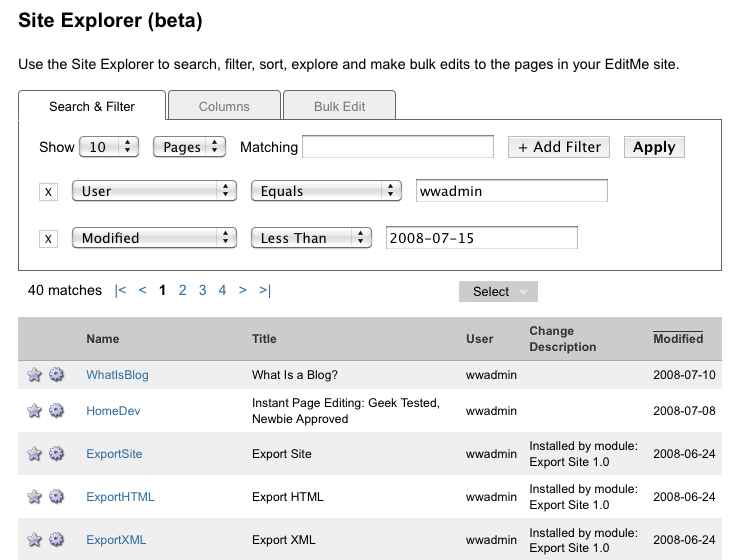
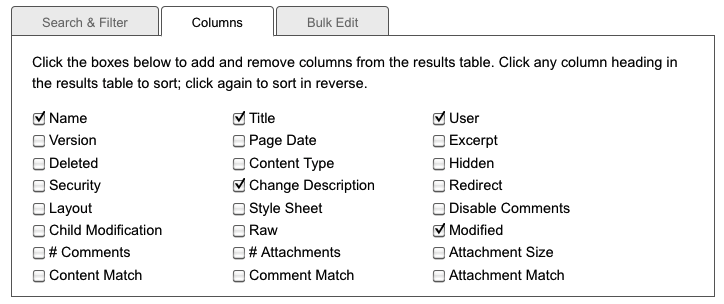
There are three tabs in the Site Explorer: Search & Filter, Columns and Bulk Edit. The Search & Filter tab is used to create powerful searches and filters to sift through the information on your site quickly and easily. You can add multiple filters to the search, each filtering on a different field. The Columns tab allows you to control which page attributes are displayed in the results. You'll be surprised how much data EditMe maintains about each page, and it's all here at your finger tips. Of course, you can click any column header to sort the results.
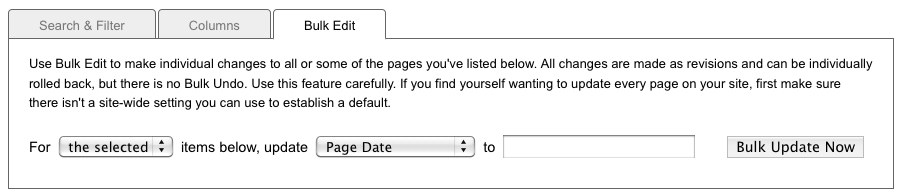
Finally, the Bulk Edit tab lets you take this powerful search and filtering mechanism and use it as a basis for managing your site. Want to delete every page tagged with a specific user name? No problem. Replace the security of all pages with a page name ending in some specific suffix with a new policy? No problem.
To start using the Site Explorer, go to your Settings screen and select Site Explorer from the Site menu.
The Site Explorer has been released in beta in order to put it in front of customers as soon as possible. There may be a few glitches remaining, and we'll be fixing those as they're found. We'll also be adding lots more to it in the coming months, including:


