
 Friday, December 11, 2009
You may have noticed and admired the box on EditMe's Support Wiki that prompts visitors to register or login, and welcomes users who have logged in back to the site with a couple of handy links.
That code has been wrapped up into a module for easy installation into any EditMe site. The module is a single scripted page named WelcomeBox that can be included easily into your site's Menu page (or elsewhere).
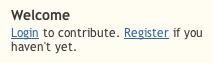
Here's what it looks like when you're not logged in:
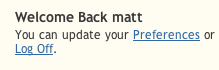
And after you've logged in:
To install, just go to Settings -> Site Management -> Modules and click Welcome Box.


